What Is a Headless CMS? Why Sanity Powers the Best Modern Websites
If you have worked with WordPress, you know the drill. Install a theme, add plugins until something breaks, then call a developer to fix what the last update destroyed. There is a better way.
Headless CMS architecture separates your content from your website's design. This sounds technical, but the business implications are massive: faster sites, better security, happier content teams, and a system that grows with you instead of holding you back.
Traditional CMS vs. Headless CMS: The Core Difference
How a Traditional CMS Works (WordPress, Drupal, Joomla)
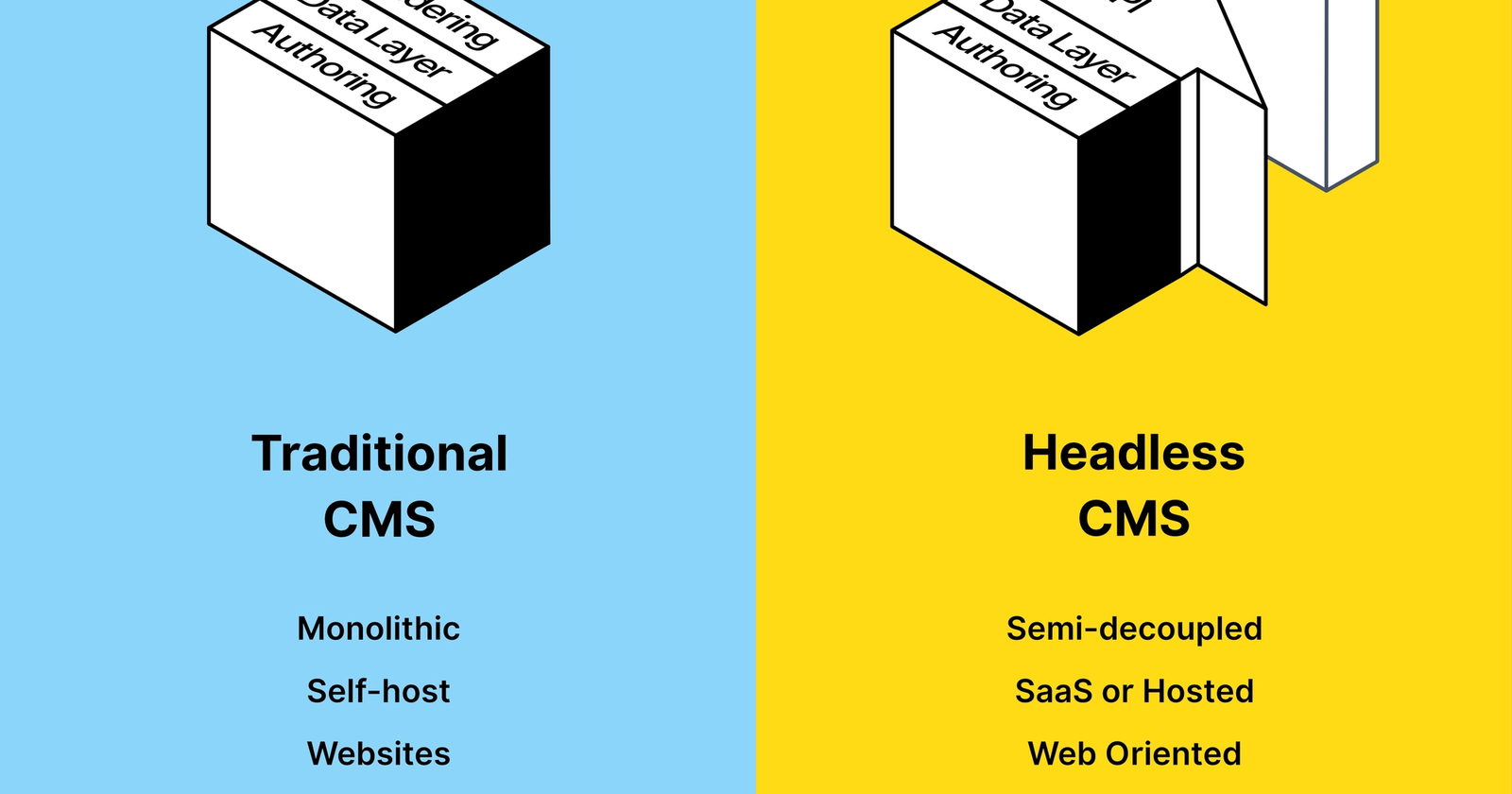
A traditional CMS is a monolith. The content management system, the database, the template engine, and the frontend are all one connected system. When someone visits your WordPress site, the server runs PHP code, queries a MySQL database, merges content with a theme template, and sends the result to the browser.
This was a reasonable architecture in 2005. In 2026, it creates problems:
- Every page request hits your server, consuming resources
- Plugins share the same codebase, creating conflicts and security vulnerabilities
- Your frontend design is limited by your theme's capabilities
- Performance degrades as you add features (every plugin adds weight)
- A security breach in one plugin can compromise your entire site
How a Headless CMS Works
A headless CMS stores and manages your content, then delivers it through an API. That is all it does. There is no frontend, no templates, no themes. Just content, available to any application that requests it.
Your website is built separately, as a modern web application using frameworks like Next.js, Remix, or Astro. It fetches content from the CMS API and renders it however you want. The "head" (frontend) and the "body" (content) are completely independent.
This means:
- Your content team manages content in a clean, purpose-built editing interface
- Your developers build the frontend with the best tools available
- Your content can be delivered to any channel: website, mobile app, kiosk, chatbot, email
- Performance, security, and scalability are handled at the architectural level, not by plugin hacks
Why Headless CMS Is Better for Business
Performance That Converts
Headless sites built with Next.js typically achieve Lighthouse performance scores of 90-100, compared to 40-70 for typical WordPress sites with multiple plugins. Pages can be pre-rendered at build time and served from CDN edge nodes worldwide, resulting in sub-second load times regardless of where your visitor is.
For Dubai businesses, this matters more than you think. A site that loads in 1 second converts at roughly 3x the rate of one that loads in 5 seconds. With headless architecture, sub-second load times are the default, not the exception.
Security Without the Headaches
WordPress's number one security weakness is its plugin ecosystem. Sucuri's annual reports consistently show that 90%+ of hacked CMS sites are WordPress, primarily due to vulnerable plugins.
With a headless CMS, there is no server-side code on your public website. The frontend is static files on a CDN. The content API is read-only by default. There is no /wp-admin for attackers to target. No plugin vulnerabilities to exploit. Security is handled architecturally, not reactively.
Content That Works Everywhere
Traditional CMS content is trapped in HTML blobs mixed with styling. It only works on the web, in that specific theme.
Headless CMS content is structured and portable. A product description stored in Sanity can render as a web page, a mobile app screen, an email template, a chatbot response, or a voice assistant answer. Write once, deliver everywhere.
For Dubai businesses with multiple digital touchpoints (website, app, WhatsApp, in-store displays), this is transformative.
Developer Experience and Team Productivity
With headless architecture, frontend developers use modern tools like React, TypeScript, and Tailwind CSS. Content editors work in a clean, customizable interface designed for their workflow. Both teams work independently.
There is no "the last plugin update broke the site" situation. No "we need to wait for the developer to change the page builder template." Content and code are separate concerns managed by the right people.
Why Sanity Specifically?
There are several headless CMS options: Contentful, Strapi, Prismic, Hygraph. We chose Sanity for specific reasons that matter for our clients.
Real-Time Collaboration (Nobody Else Has This)
Sanity is the only headless CMS that offers Google Docs-level real-time collaboration. Multiple editors can work on the same document simultaneously, seeing each other's changes in real time. No "locked for editing" messages. No overwriting each other's work.
Contentful does not have this. Strapi does not have this. For teams with multiple content contributors, this alone is a deciding factor.
GROQ: A Query Language Built for Content
Sanity created GROQ (Graph-Relational Object Queries), a purpose-built query language for content. It is more concise than GraphQL for common CMS operations and supports complex filtering, joining, and projecting in a single expression.
A single GROQ query can fetch a homepage, expand all its sections, resolve referenced case studies and testimonials, and select only the fields you need. In GraphQL, the same operation would require deeply nested queries or multiple round trips.
Sanity also offers a GraphQL API for teams that prefer it. You are not locked into one approach.
Portable Text: Rich Content Without the HTML Mess
Most CMS platforms store rich text as HTML. This creates problems: HTML blobs contain presentation mixed with content, they are difficult to render on non-web platforms, and editors can paste unpredictable formatting.
Sanity uses Portable Text, a specification that stores rich content as structured JSON. A heading is semantically marked as a heading, not as "font-size: 32px; font-weight: bold." This makes content truly portable and future-proof.
Customizable Studio
Sanity Studio is an open-source React application that serves as the editing interface. It is fully customizable with React components. You can build exactly the editing experience your content team needs.
Need a custom color picker for brand guidelines? Build it. Want an AI-assisted content field? Add it. Need a live preview that shows changes in the actual website design? Built-in.
Pricing That Makes Sense
Sanity's pricing model scales gradually:
- Free plan: 3 users, 500K API CDN requests/month. Perfect for small projects.
- Growth plan: ~$15/user/month. 1M CDN requests with pay-as-you-go overages.
- Enterprise: Custom pricing for large organizations with SLA requirements.
Compare this to Contentful, where the jump from free to paid starts at $300+/month, and Sanity's value becomes clear. A typical business website will comfortably run on the Growth plan for years.
How Sanity Compares to Alternatives
Sanity vs. Contentful
- Real-time collaboration: Sanity yes, Contentful no
- Query language: GROQ (powerful, concise) vs. GraphQL only
- Studio customization: Fully open-source React vs. limited UI extensions
- Pricing: Gradual scaling vs. steep tier jumps
- Localization: Plugin-based (flexible) vs. built-in field-level (opinionated)
Contentful has stronger brand recognition and built-in localization. Sanity wins on collaboration, customization, and pricing predictability.
Sanity vs. Strapi
- Hosting: Sanity is fully managed vs. Strapi requires self-hosting (or Strapi Cloud)
- Real-time collaboration: Sanity yes, Strapi no
- Scalability: Automatic vs. you manage scaling
- Open source: Sanity Studio is open-source; Strapi core is fully open-source
Strapi is the right choice if you need full control over your data and want self-hosting. Sanity is better if you want managed infrastructure with zero DevOps overhead.
Common Objections (And Honest Answers)
"It's too technical to set up"
True: the initial setup requires a developer. You cannot install a headless CMS site from a one-click installer. However, once built, the editing experience is often simpler than WordPress. Your content team gets a clean, purpose-built interface with exactly the fields they need. No navigating complex admin menus or accidentally breaking layouts.
"It's more expensive"
The upfront development cost is higher than a WordPress theme. But consider the total cost over 3 years: WordPress's plugin subscriptions, managed hosting, maintenance retainers, security incident responses, and emergency fixes add up fast. The headless approach typically reaches cost parity at 12-18 months and saves money every month after that.
"WordPress has more plugins"
WordPress has 60,000+ plugins because its core needs extending for basic functionality. Headless architecture handles most of those needs natively: SEO through the framework's metadata API, caching through static generation, security through architecture, image optimization through the asset pipeline. Having 60,000 plugins also means 60,000 potential compatibility issues and security vulnerabilities.
"My team will not be able to use it"
Onboarding typically takes 1-2 hours for basic content editing. Sanity Studio's interface is modern and intuitive. Most teams find it easier than WordPress's increasingly cluttered admin panel. And because the interface is customizable, you can build exactly the workflow your team needs, nothing more, nothing less.
Who Should Use a Headless CMS?
You should consider headless if:
- Lead quality matters and you need behavioral tracking, scoring, or custom forms
- You need Arabic and English with proper RTL support
- Page speed is important for your conversion funnel
- Multiple people edit content and you need real-time collaboration
- You have (or plan to have) a mobile app, email templates, or other channels consuming the same content
- You want to own your content and code without vendor lock-in
- Security and reliability are non-negotiable
You might NOT need headless if:
- You are a small business that needs a simple site up this week
- You have no developer resource available for the initial build
- Your site is a simple blog with no lead generation requirements
- Budget is your primary constraint and total cost of ownership is less important than initial cost
The Bottom Line
Headless CMS is not a trend. It is the architecture that companies like Nike, Figma, Cloudflare, Burger King, and National Geographic use to power their digital presence. The headless CMS market is projected to grow from $750 million in 2023 to $5.5 billion by 2032.
For Dubai businesses competing in premium markets where lead quality, multilingual support, and performance directly impact revenue, headless architecture with Sanity is not just the modern choice. It is the profitable one.
The question is not "can we afford to go headless?" It is "can we afford not to?"
Continue reading
→ Agentic Search Is Here. Your CMS Decides If You Survive It.
→ Next.js vs WordPress vs Framer vs Webflow: The Honest Comparison for Dubai Businesses
Written by
Shape Shifter Team
Digital Growth Agency
Want a straight read on your own setup?
The first conversation is free, 45 minutes, no deposit. No proposal unless you ask for one.
Book the first conversation